Setting up a Server#
Warning
Murder Run only supports Minecraft 1.21.10 as of right now. If you choose any other version, the plugin will not start-up, and it will break. Make sure to choose Paper 1.21.10 for now. Support for future versions will be added as fast as possible.
To set up Murder Run, you will need two things:
A Minecraft Bukkit-Based Server
A Murder Run Plugin JAR
Setting up a Bukkit-Based Server#
In order to get a Minecraft Bukkit-based Server, you need to download either Spigot, Paper, or any other Bukkit-fork software. I recommend downloading Paper – it’s also the software I develop against actively for Murder Run.

Fig. 1 PaperMC Team#
To set up a Paper server, refer to the Getting Started Guide that Paper has posted on their website. It includes a very detailed step-by-step guide to set up the server onto your computer, and how to add plugins
Getting Murder Run#
Murder Run is like any other plugin, where you just drag and drop the JAR file into the plugins folder. There isn’t any set up required, and Murder Run will download the necessary dependencies for you. You can find bleeding-edge releases on the TeamCity CI here, which are created pretty frequently. You should always use the latest Murder Run JAR, as it contains many more bug fixes and version compatability than the previous.
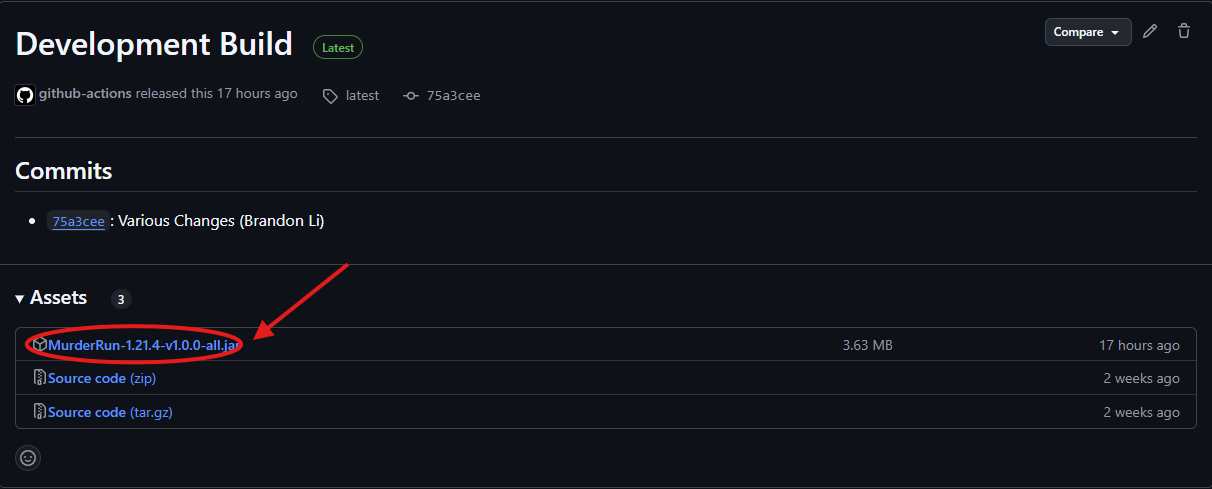
Fig. 2 Murder Run JAR Releases#
Dependencies#
Murder Run has three essential dependencies, WorldEdit, Citizens, and PacketEvents. All are necessary in order for the plugin to function. Murder Run will automatically download these plugins for you on start-up, but in the case that they aren’t downloaded for some reason, make sure to download all three plugins and drop them into the plugins folder so Murder Run is able to load.
Fig. 3 Citizens Plugin#
Murder Run also hooks into several other plugins, like Libsdisguises, PlaceholderAPI, Parties, Nexo, Citizens, and many other plugins for features. You are able to see some of these features later on.
Once you’re done reading, take a look at the configuration page!