Configuring Murder Run#
Murder Run has thousands of configuration options. Here’s a brief guide for each configuration file and what they do.
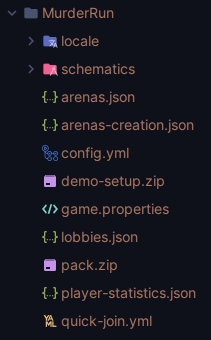
Fig. 4 Standard Murder Run Files#
Permissions#
Each command has their own permission node, which is marked by the .info command. If you use a permissions manager like
LuckPerms, you can see all the possible permissions.
Plugin Configuration#
The plugin configuration file is stored as plugin.yml under the Murder Run data folder. There are comments in the
configuration file that specify what each option does. For example, you can set the plugin language to be ZH_CN or
Simplified Chinese through this file. Or the way you want to serve the resource-pack to your users.
Locale#
The locale file is stored under the locale folder under the Murder Run data folder. Based on the language that was
chosen in the plugin configuration (plugin.yml) file, the proper locale file will be here. You’re able to change any
messages, color, formatting, to your heart’s desire as much as you want. These messages use the MiniMessage
format. You can use an easy text converter here, which allows you to color text and create
components.
Game Properties#
The game properties file is stored as game.properties under the Murder Run data folder. This properties file contains
many settings to all in-game specific options. For example, disabling or enabling certain gadgets can be done through
this configuration file. There are comments in the game.properties file which specify what each configuration option
does, and how to configure it.
Resource Pack#
The resource pack is stored as pack.zip under the Murder Run data folder. The pack.zip file is a zipped pack of all
the resources that will be sent to users when the game starts. If you want to edit the resource-pack, unzip the
pack.zip file and change what you need. Re-zip your changes, and make sure that the zip file is named pack.zip
still and in the same exact directory. Murder Run will apply your changes and send them to users.
Quick Join Configuration#
The quick-join configuration is stored as quick-join.yml under the Murder Run data folder. This configuration file
contains the pairs of all quick-join games. You are able to specify your arena-lobby pairs in this file, so that when
players run the /murder game quick-join command, a random arena-lobby chosen from the pairs you specified in this file
is loaded. Please note that the arena-lobby pairs both MUST BE VALID ARENAS AND LOBBIES. If Murder Run doesn’t recognize
the arena or lobby exists, it silently skips it as if it never existed. You must have existing arenas and lobbies created
before you can configure this file, because Murder Run parses this file on start-up.
Other Additional Files#
Other additional files include other files that you shouldn’t configure, and just meant for data storing purposes.
Schematic Storage#
The schematic folder under the Murder Run data folder contains two folders named lobbies and arenas. The lobbies
folder contains lobby schematics, while the arenas folder contains arena schematics.
Arena Storage#
The arena.json file under the Murder Run data folder stores all arena information, such as their name, origin, bounds,
part locations, etc.
Lobby Storage#
The lobby.json file under the Murder Run data folder stores all lobby information, such as their name, origin, and
bounds.
Arena Creation Storage#
The arena-creation.json file under the Murder Run data folder contains player data for their last arena creation
defaults used in the GUI.
Demo Zip#
The demo-setup.zip file under the Murder Run data folder contains the demo worlds and data used when the player creates
a test lobby and arena demo used the /murder demo command.
Player Statistics#
The player-statistics.json file under the Murder Run data folder contains all player statistics for users.